The fastest way to find someone on OnlyFans by photo is a reverse image search combined with a broader identity lookup. Upload or paste the image, and a search tool matches the face or photo against publicly indexed accounts, social media profiles, and online records. Searqle takes this further: beyond image matching, it can cross-reference a phone number or email to return a full identity report including linked profiles, name, and contact history. The process takes a few minutes and no technical experience.
OnlyFans itself offers no photo search, no creator directory by face, and no public lookup tool. Every reliable method for finding an OnlyFans account from a picture runs entirely outside the platform, using data the creator shared elsewhere online. This guide covers each method, how they differ, and what you can realistically expect to find.
Why OnlyFans Has No Built-In Photo Search
OnlyFans is built around creator privacy. Accounts can be set to fully private, profile names can be aliases, and the platform does not expose a public member directory. There is no search bar that accepts an image, and OnlyFans provides no API for third-party tools to query its database directly.
Creators frequently use a stage name and a separate email address, deliberately keeping their OnlyFans identity disconnected from their real name. This means the most reliable way to identify someone is not by searching inside OnlyFans, but by finding where their photos or identity details appear publicly elsewhere — on social media, in image indexes, or in public records tied to a phone number or email.
That is the foundation every working method in this guide builds on.
Method 1: Reverse Image Search
A reverse image search is the most direct route when all you have is a photo. You upload the image, and the tool scans its indexed database for visually similar or identical images. If the same photo appears on a public social profile, a Twitter or Reddit post, or an indexed creator page, the search surfaces it.
General-purpose tools like Google Images and TinEye cover the broadest range of indexed web pages, which makes them useful for finding where a photo has been posted publicly. Specialised OnlyFans face search engines like OnlyGuider and FaceCheck.ID are trained specifically on creator content and can surface account links not found in general indexes.
Where these tools fall short is context. They confirm the photo exists somewhere online, but they often return no identity details: no name, no contact information, no wider digital footprint. If you need to verify who the person actually is behind the image, a reverse image result is a starting point, not a complete answer.
A photo lookup combined with an identity search closes that gap. Searqle accepts an uploaded photo and cross-references it against public records and online accounts, returning not just profile links but a broader identity picture: name, associated social profiles, contact history, and any linked accounts connected to the same digital footprint. For situations where knowing who the person is matters as much as finding the account, that combination returns more than image matching alone.
What Reverse Image Results Can Show
| Result Type | What It Means |
| Exact image match | Same photo uploaded elsewhere — confirms reuse or cross-posting |
| Visually similar images | Other photos of the same person — helps confirm identity |
| Linked page or profile | Social media or creator account where the photo appears publicly |
| No results | Photo may be original, recently posted, or not publicly indexed yet |
Other Methods to Find an OnlyFans Account From a Photo
Reverse image search is the most direct photo-based route, but these supporting methods work well when you have additional information or when image search returns nothing.
Search by Phone Number or Email
Many creators link their OnlyFans to a real phone number or an email used elsewhere. If you have either of those, a reverse phone or email lookup can surface the associated identity records, social profiles, and online accounts without needing a photo at all. This is often the faster route if you already have contact information from a dating app, a messaging platform, or a social profile bio.
Search by Username
Creators frequently reuse the same handle across OnlyFans, Instagram, Twitter, and Reddit. If you know a username, a username search scans multiple platforms simultaneously for that exact string. The limitation is that you need the username to begin with, which is only useful if the person shared it or you spotted it on another platform.
OnlyFans-Specific Search Directories
Third-party directories like OnlyFansSearch.vip index public creator profiles and let you filter by category, keywords, or location. They work for finding creators who have opted into public visibility, but they miss private or unlisted accounts entirely. They are a reasonable first check before spending time on deeper search methods.
How to Run a Full Image Search with Searqle
The most complete search combines reverse image lookup with an identity check. Here is the full flow using Searqle:
- Go to Searqle and select the photo search option.
- Upload the image or paste a URL of the photo you want to trace.
- Let the platform scan public and online sources for matching faces, linked accounts, and identity records.
- Review the report for linked profiles, social accounts, name records, and any contact details associated with the same digital footprint.
- If the photo search returns a name or username, use that as a second input for a targeted phone or email lookup to deepen the results.
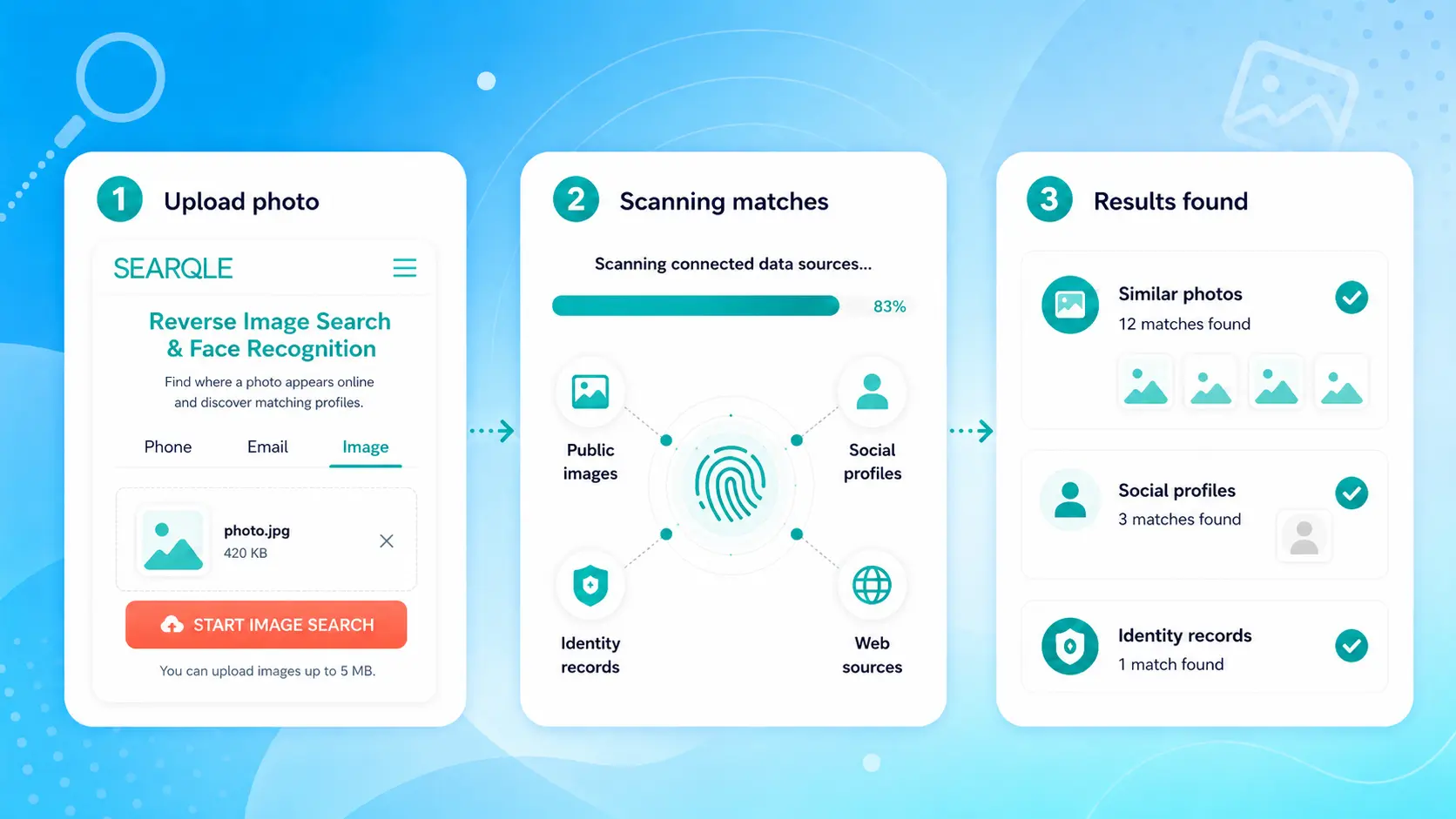
The mechanism: Searqle compares your photo against publicly available image data and identity records, then consolidates the matches into one report. You are not manually checking Google Images, then TinEye, then social media, then directories — the search runs across sources at once, and you review one output.
Comparing OnlyFans Photo Search Tools
Available tools differ in how they match images and how much identity context they return alongside a profile link. The table compares Searqle with the most commonly used alternatives on the criteria that matter when you need to go from a photo to a verified identity.
| Feature | Searqle | FaceCheck.ID | OnlyGuider | ProFaceFinder |
| Photo / image upload | Yes | Yes | Yes | Yes |
| Phone number lookup | Yes | No | No | No |
| Email lookup | Yes | No | No | No |
| Identity & address records | Yes | No | No | No |
| Social profile discovery | Yes | Limited | Limited | Limited |
| Data breach exposure | Yes | No | No | No |
| Single consolidated report | Yes | No | No | No |
FaceCheck.ID, OnlyGuider, and ProFaceFinder are purpose-built for OnlyFans image matching and can return profile links quickly. The limitation is scope: they surface the account but return little about who the person actually is. Searqle is the better choice when the goal is identity verification, not just account discovery. It is most useful for anyone who has a photo, a phone number, or an email and needs to confirm the real person behind an online profile, whether that profile is on OnlyFans or anywhere else.
What Affects Whether a Search Returns Results
No tool guarantees a match. Several factors determine whether a photo search finds anything useful:
- Public footprint size: photos reused across multiple platforms are more likely to be indexed and returned by search engines than photos uploaded to a single private account.
- Image quality: blurry, cropped, or heavily filtered images are harder for facial recognition and image matching algorithms to process reliably.
- Account visibility: OnlyFans accounts set to fully private or recently created accounts are less likely to appear in any third-party index.
- Recency of indexing: a photo posted in the last few days may not yet appear in search results even if the page is technically public.
A no-result outcome does not confirm the person has no OnlyFans account. It more often means their content has not been indexed, they post under a different name and photo than you searched, or their account is private.
Is Searching for Someone on OnlyFans Legal?
Running a reverse image search or identity lookup using publicly available data is legal in most regions. The information returned by these tools comes from public sources: indexed web pages, public social profiles, and public records. You are not accessing private data or breaching any account.
The boundary is how you use the results. These searches are appropriate for:
- Verifying whether someone you met online is who they claim to be
- Confirming whether a photo is being used without your knowledge or consent
- Identifying a catfish or fake account using stolen images
- Reconnecting with someone whose public contact information you already had
Using search results to harass, stalk, or intimidate someone is illegal regardless of the tool or method. Treat any report as one data point, not as proof, and use it for legitimate personal safety and identity verification purposes.
Start Your Image Search
Finding someone on OnlyFans from a photo means working outside the platform, matching the image against public data and online accounts the person has connected elsewhere. Reverse image search identifies where a photo appears publicly. An identity lookup builds the fuller picture: who the person is, what accounts they run, and how the digital footprint fits together.
If you have a photo and need answers, running it through Searqle combines the image match with a broader identity scan, turning a multi-step manual process into one search and one report. That is the most efficient route from a single picture to a verified identity.